

What are Prompt Templates?
Prompt Templates are pre-written marketing analysis prompts you can copy and use directly with Claude. They cover the most common reporting tasks so you do not have to figure out how to phrase your questions. Browse all templates at app.detrics.io/mcp/templates.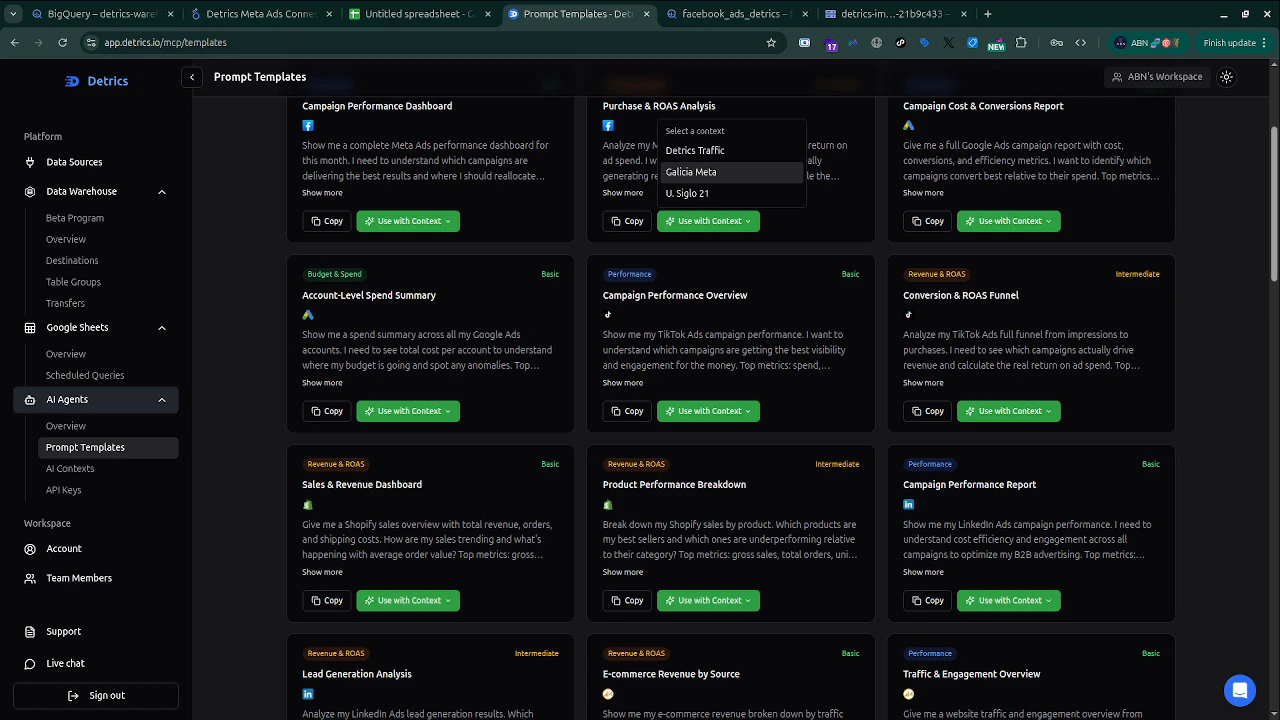
How to use them
1
Browse templates
Open the Prompt Templates page in the Detrics web app. Templates are organized by category, performance, ROAS, conversions, e-commerce, and more.
2
Copy or use with Context
Each template has two buttons:
- Copy: copies the prompt text to your clipboard. Paste it into Claude.
- Use with Context: lets you select an AI Context to automatically scope the prompt to specific accounts and platforms.
3
Paste and run
Paste the prompt in Claude and send it. Claude will call the Detrics MCP tools, fetch your data, and return the analysis.
4
Customize as needed
All templates are starting points. Adjust date ranges, platform names, or account details to match your needs:Can become:
Template categories
Performance Overview
Get a high-level summary of how your marketing is performing.- “Give me a full performance overview for the last 30 days, spend, ROAS, conversions, and CPA”
- “Summarize my marketing performance this week compared to last week”
- “What was my total ad spend across all platforms last month?”
Cross-Platform Comparison
Compare performance across different platforms and channels.- “Compare Google Ads vs Meta Ads spend and ROAS for the last 30 days”
- “Which platform had the best CPA this month?”
- “Show me a breakdown of spend by platform for the last quarter”
Campaign Analysis
Drill down into specific campaigns.- “Show me my top 5 campaigns by conversions this week”
- “Which Google Ads campaigns are over budget this month?”
- “List all active Meta Ads campaigns with their spend and ROAS”
Purchase and ROAS Analysis
Understand revenue attribution and return on ad spend.- “Analyze my purchase and ROAS funnel for the last 30 days”
- “Compare ROAS across all platforms this month”
- “Which campaigns have the highest return on ad spend?”
E-commerce and Revenue
Analyze revenue, orders, and product performance.- “What’s my Shopify revenue for the last 30 days?”
- “Compare my total ad spend vs Shopify revenue this month”
- “Show me my average order value trend over the last 90 days”
Lead Generation
Track lead acquisition performance.- “Analyze my lead generation results for the last 30 days”
- “Which platforms are generating the most leads?”
- “What’s my cost per lead across all channels?”
Suggested workflow
For the best results when working with Claude:- Start with a performance overview: get the big picture first
- Drill down into problem areas: use campaign or platform-specific templates to investigate
- Set up AI Contexts for recurring reports, create a Context once, then use simple prompts every time