

Last updated: May 18, 2026
Pricing & Plans
Detrics offers flexible pricing plans designed to scale with your business. Choose between our Google Sheets Addon, Looker Studio Connectors, and the BigQuery Data Warehouse based on your needs.Google Sheets Addon Plans
Annual Pricing
Save up to 23% annually! All paid plans include a significant discount
when billed yearly.
Premium Features
Pro & Business Plan Benefits
Unlimited Usage (Business)
Don’t worry about data update limits with unlimited updates. Scale without extra costs as your business grows.
Team Collaboration
Shared subscriptions with Pro and Business plans. Add additional users and
manage multi-account teams efficiently with centralized data access.
Free Migration
Pro and Business plans include free Supermetrics migration assistance to help
you transition seamlessly.
Dedicated Support
Get direct access to our team through a dedicated Slack channel for immediate assistance.
Understanding Data Updates
What counts as a Data Update?
What counts as a Data Update?
A data update is counted each time you:
- Execute a data pull from any connected platform
- Refresh existing data in your spreadsheet
- Run scheduled automatic updates
Looker Studio Connectors
Annual Pricing
Save 25% annually! Both Looker Studio plans include a significant discount
when billed yearly. No credit card required to start your free 14-day trial.
BigQuery / Data Warehouse Plans
The Data Warehouse syncs marketing data from every Detrics-supported platform directly into your own Google BigQuery project. Pricing is quote-based, scaled to the number of connectors and ad accounts you need, book a demo for a personalized quote.What’s included
Every data source
Sync any Detrics-supported platform. Flexible bundling, you only pay for the connectors and accounts you actually use.
3 sync modes
Incremental, Full Refresh, and Full Append, with per-table configuration and scheduling.
You own your data
Data lands in your own GCP project. No data-volume fees from Detrics, you only pay Google for your BigQuery usage.
AI-powered query layer
Query your warehouse with Claude, plus dedicated support and a custom SLA.
BigQuery pricing isn’t a fixed tier, it’s tailored to your setup. Book a demo for a personalized quote.
Support Levels
Choosing the Right Destination
When selecting between Google Sheets and Looker Studio, consider your data volume and refresh needs:- Google Sheets Recommended
- Looker Studio Recommended
- Timeframes longer than 7 days for Ads platforms
- 30+ days of data with multiple accounts
- Heavy data platforms: TikTok Ads, Meta Ads, Tiendanube, Shopify
- Need for custom calculations and data manipulation
- Requirement for data caching and improved performance
Billing Information
Payment Methods
- Credit/Debit cards (Visa, Mastercard, American Express, Diners)
- Google Pay
- Bank transfers and ACH (Business+ only)
- Annual invoicing available
Billing Cycles
- Monthly billing with no long-term commitments
- Annual billing with 25% discount
- Custom enterprise agreements available
- Free 14-day trial for Looker Studio (no credit card required)
How to change tax information
Follow these three simple steps to update your tax information:1
Access Your Account
Navigate to app.detrics.io/account and
click the “Manage subscription” button next to your current plan.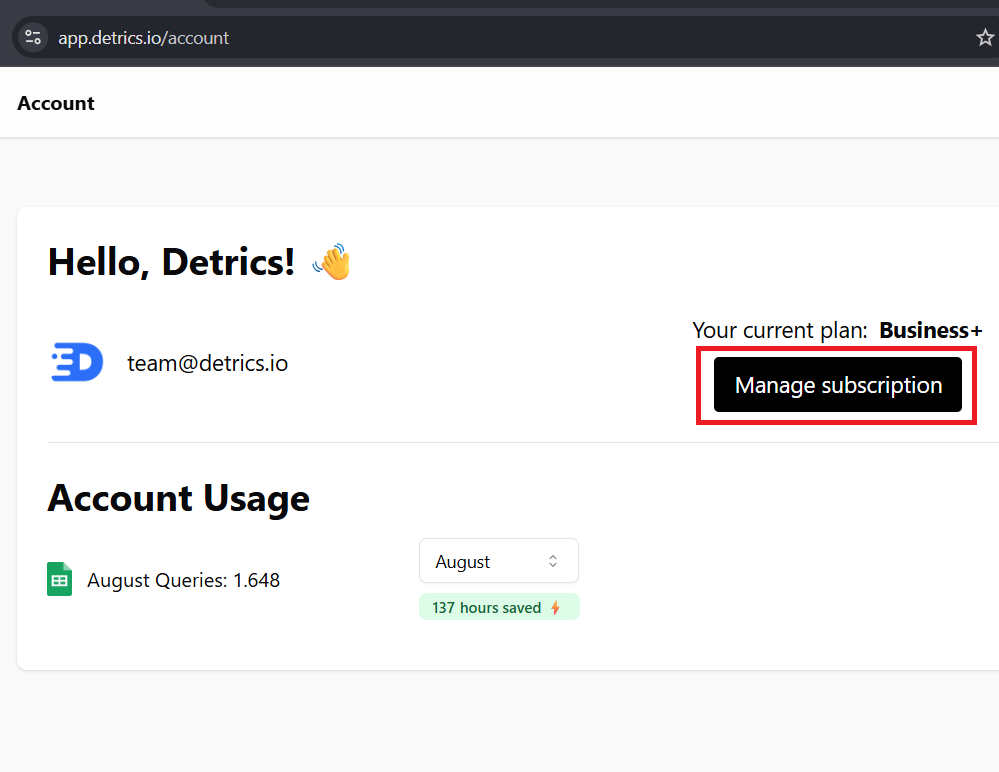
2
Update Billing Information
In the Stripe billing portal, click “Update information” under the Billing
Information section to modify your name, email, or billing address.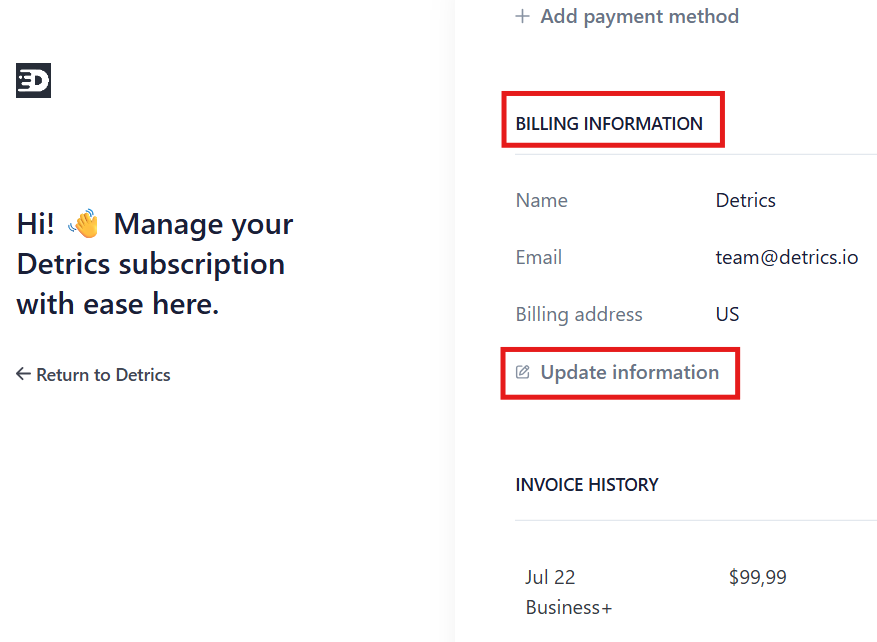
3
Add Tax ID
Scroll down to the Tax ID section, select your ID type from the dropdown,
enter your tax identification number, and click “Save” to apply the changes.
Upgrading Your Plan
Ready to unlock more features? You can upgrade your plan at any time:- Visit detrics.io/pricing
- Select your plan
- Changes take effect immediately
Questions?
Have questions about pricing or need a custom plan? Contact our support team:- Email: [email protected]
- Live Chat available in Argentina GMT-3 timezone from 9 AM to 6 PM