

Last updated: December 5, 2025
Why Does This Happen?
Looker Studio uses Google Apps Script to fetch data from connectors. Google enforces a strict 6-minute execution limit on all Apps Script functions. This is a Google platform limitation, not a Detrics limitation. When your data request takes longer than 6 minutes to process, Google terminates the request and Looker Studio displays an error.This limit applies to all community connectors in Looker Studio, not just Detrics.
What Causes Requests to Exceed the Limit?
Several factors can cause your requests to approach or exceed the 6-minute limit:Quick Fixes
Try these adjustments to reduce request time:1
Reduce your time frame
Instead of “Last 12 months”, try “Last 30 days” or “Last 7 days”. You can always create separate charts for historical comparisons.
2
Reduce the number of accounts
If you’re pulling data from multiple accounts, split them across separate data sources or pages.
3
Avoid ad-level data
Use campaign or ad set level granularity instead of individual ads. Ad-level data significantly increases response times.
4
Apply filters
Filter by campaign status (active only), specific campaign names, or other criteria to reduce the data volume.
The Best Solution for Large Data Volumes
For large accounts, many accounts, or when you need historical data, the most reliable approach is to use Google Sheets as an intermediary layer between your data sources and Looker Studio.Data Sources
Facebook Ads, Google Ads, TikTok Ads, etc.
Detrics for Google Sheets
Pull data with scheduled queries (no time limits)
Google Sheets
Data stored and refreshed automatically
Looker Studio
Instant data loading from Sheets
Why This Works Better
How to Set It Up
1
Get your data into Google Sheets
Use Detrics for Google Sheets to create queries that pull your marketing data. Set them to refresh automatically on a schedule.
2
Connect Sheets to Looker Studio
In Looker Studio, add a new data source and select “Google Sheets”. Choose the spreadsheet containing your Detrics data.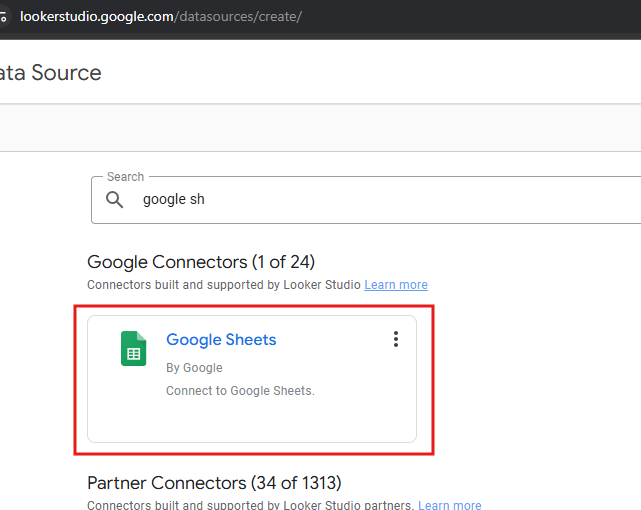
3
Build your dashboard
Create your visualizations using the Sheets data source. Since the data is already in Sheets, Looker loads it instantly.
Benefits of the Sheets Approach
No Time Limits
Sheets queries run in the background without the 6-minute limit. Large historical pulls complete successfully.
Faster Dashboards
Looker reads from Sheets instantly. No waiting for API calls every time you view the dashboard.
Combine Data Sources
Merge data from multiple platforms and accounts in a single sheet, then visualize in Looker.
Custom Calculations
Add formulas in Sheets to create custom metrics before they reach Looker Studio.
When to Use Each Approach
Still Experiencing Issues?
If you’ve tried these solutions and still encounter problems:- Check your internet connection stability
- Try refreshing during off-peak hours
- Contact [email protected] with details about your setup