> ## Documentation Index
> Fetch the complete documentation index at: https://support.detrics.io/llms.txt
> Use this file to discover all available pages before exploring further.
# Facebook Ads (Meta Ads) Troubleshooting
> Complete troubleshooting guide for Facebook Ads integration
**Last updated:** August 11, 2025
Having trouble connecting your Facebook Ads account to Detrics? This comprehensive guide will help you diagnose and resolve the most common connection issues.
## Understanding Facebook Access Expiration
Access to Facebook can expire for various reasons. These are the most common causes of connection issues:
Changing your Facebook password automatically revokes access tokens for
connected third-party applications.
Meta may revoke access during routine security reviews, especially for
recently connected applications like Detrics.
Access tokens have built-in expiration dates and need periodic renewal to
maintain connection.
**Solution:** When access expires, you'll need to **reconnect your Facebook Ads account to Detrics** through the connection setup process. This re-establishes the authentication and renews the access tokens.
**Important:** Once you reconnect Meta Ads, all your existing queries and Looker Studio dashboards linked to your Meta accounts will automatically start working again. The reconnection process fixes all connections at once - you don't need to recreate your queries or dashboards.
## Fix Persistent Connection Issues (Full Reset)
If reconnecting doesn't resolve your issues, follow these steps for a complete reset. This will fix all your Meta Ads queries and dashboards at once.
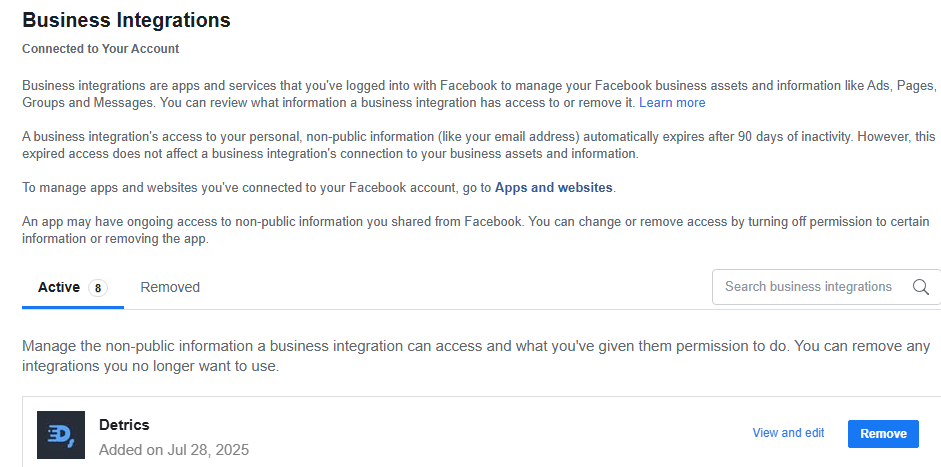
Go to [Facebook Business Tools
Settings](https://www.facebook.com/settings?tab=business_tools) and click on
"Remove" next to the Detrics app.
 Open a new Google Spreadsheet or [click here](https://sheets.new) to create a
new sheet directly.
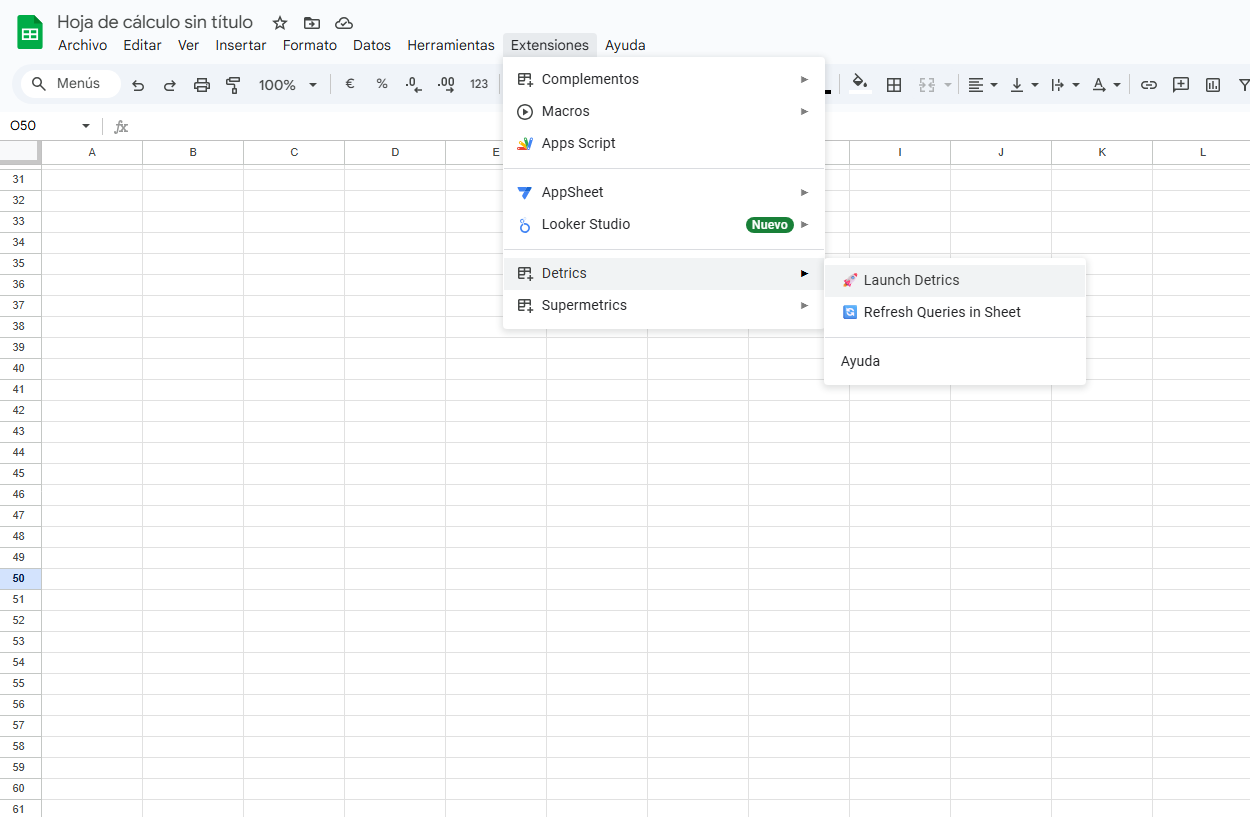
Fire up Detrics: Select *Extensions* > *Detrics* > *Launch*
Open a new Google Spreadsheet or [click here](https://sheets.new) to create a
new sheet directly.
Fire up Detrics: Select *Extensions* > *Detrics* > *Launch*
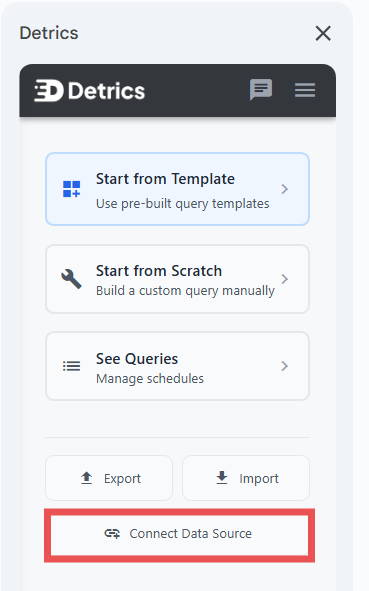
 Click on *"Connect Data Source"*
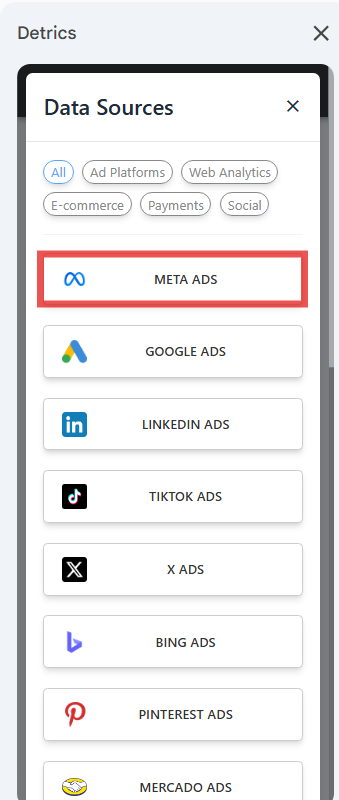
 Select Facebook Ads and complete the reconnection process to re-establish
access.
Select Facebook Ads and complete the reconnection process to re-establish
access.
 ## Shared Connection Between Google Sheets and Looker Studio
Google Sheets and Looker Studio share the same Meta Ads connection. This means:
* **Single reconnection fixes both platforms:** When you reconnect Meta Ads through Google Sheets, your Looker Studio dashboards are automatically fixed too
* **No duplicate setup needed:** You only need to reconnect once, regardless of which platform you primarily use
### Alternative: Reconnect Through Looker Studio
Looker Studio users can also reconnect Meta Ads directly through Looker Studio:
1. Open your Looker Studio dashboard that uses Meta Ads data
2. Click on any chart showing connection errors
3. Select "Reconnect" when prompted
4. Complete the Meta Ads authentication process
5. All your Meta Ads queries in both Looker Studio and Google Sheets will be restored
**Need help?** If errors persist after following these steps, please reach out
to [support@detrics.io](mailto:support@detrics.io)
## Meta Server Instability
### Understanding Meta's API Limitations
**Error message:** "⚠️ Meta servers are experiencing high load"
Meta's API can become unstable when processing certain types of data requests, particularly:
**Large Data Requests:**
* **Ad-level data** with extensive timeframes
* **Hourly or daily aggregations** over long periods
* **Multiple accounts** with detailed breakdowns
### Quick Solutions
When you encounter this error, try these solutions in order:
**Start with a smaller date range:**
* Instead of 6 months, try 1 month
* For hourly data, limit to 7 days
* For daily data, limit to 30 days
**Use higher-level aggregations:**
* Campaign level instead of Ad level
* Ad Set level instead of Ad level
* This significantly reduces API load
**Adjust your time grouping:**
* Switch from "Hourly" to "Daily"
* Switch from "Daily" to "All Time"
* Use "Weekly" or "Monthly" for long timeframes
**For large datasets, create multiple queries:**
* Split by date ranges (e.g., monthly queries)
* Split by account (one account per query)
* Combine results afterward in your spreadsheet
**Still having issues?** If none of these solutions work, please try again in a few hours. These server instability issues typically last from a few hours to 24-48 hours in the most extreme cases.
### Why This Happens
Meta's API has several limitations that can trigger this error:
| Factor | Impact | Solution |
| ----------------------------- | ----------------------------------------------------------------------------------- | -------------------------------------------------------------------------------------------------- |
| **Random Meta instability** | Meta's servers occasionally fail to process requests regardless of query complexity | Wait and retry in a few hours |
| **Ad-level complexity** | Each ad requires multiple API calls | Use Campaign or Ad Set level |
| **Long timeframes** | Exponentially more data to process | Limit to 30-90 days |
| **Granular time aggregation** | Hourly/daily creates more data points | Use weekly/monthly for long periods |
| **Multiple breakdowns** | Each dimension multiplies data volume | Reduce dimensions temporarily (e.g., age, gender, country, platform position, publisher platforms) |
### Best Practices to Avoid This Error
To avoid encountering this instability, we recommend implementing a **Historical + Dynamic sheet strategy**:
#### The 3-Sheet Strategy
Set up three sheets to separate your data:
1. **"Meta Ads Combined"** - Your main reporting sheet with all data
2. **"Meta Ads Dynamic"** - Recent data that updates daily
3. **"Meta Ads Historical"** - Archived data that doesn't change
#### How to Implement This Strategy
Export all your historical data (e.g., all 2024 data and 2025 data up to the previous month) to the "Meta Ads Historical" sheet. This data is "golden" - it won't change because Meta's longest attribution window is 28 days.
Create a smaller query in "Meta Ads Dynamic" that only pulls recent data (from
the previous month onwards). This smaller timeframe rarely triggers Meta's
instability errors.
In your "Meta Ads Combined" sheet, use this formula to merge both datasets:
```
=QUERY({
'Meta Ads Historical'!A2:Z;
'Meta Ads Dynamic'!A2:Z
}, "SELECT * WHERE Col1 is not null", 0)
```
This gives you complete data without the load issues.
Every 6 months, or when you notice instability errors becoming more frequent, move older data from Dynamic to Historical. This keeps your dynamic query small and fast.
**Example:** If you have a 2-year ad-level daily query that fails:
* Historical sheet: All data up to June 2025
* Dynamic sheet: July 2025 onwards
* Combined sheet: Merges both for complete reporting
When you encounter issues again in 1-2 years, simply repeat this optimization process.
**Need help implementing the 3-sheet strategy?** Our support team can guide
you through the setup process and help optimize your Meta Ads queries for
maximum stability. Reach out to [support@detrics.io](mailto:support@detrics.io) with your specific use case
and we'll provide personalized recommendations.
## Shared Connection Between Google Sheets and Looker Studio
Google Sheets and Looker Studio share the same Meta Ads connection. This means:
* **Single reconnection fixes both platforms:** When you reconnect Meta Ads through Google Sheets, your Looker Studio dashboards are automatically fixed too
* **No duplicate setup needed:** You only need to reconnect once, regardless of which platform you primarily use
### Alternative: Reconnect Through Looker Studio
Looker Studio users can also reconnect Meta Ads directly through Looker Studio:
1. Open your Looker Studio dashboard that uses Meta Ads data
2. Click on any chart showing connection errors
3. Select "Reconnect" when prompted
4. Complete the Meta Ads authentication process
5. All your Meta Ads queries in both Looker Studio and Google Sheets will be restored
**Need help?** If errors persist after following these steps, please reach out
to [support@detrics.io](mailto:support@detrics.io)
## Meta Server Instability
### Understanding Meta's API Limitations
**Error message:** "⚠️ Meta servers are experiencing high load"
Meta's API can become unstable when processing certain types of data requests, particularly:
**Large Data Requests:**
* **Ad-level data** with extensive timeframes
* **Hourly or daily aggregations** over long periods
* **Multiple accounts** with detailed breakdowns
### Quick Solutions
When you encounter this error, try these solutions in order:
**Start with a smaller date range:**
* Instead of 6 months, try 1 month
* For hourly data, limit to 7 days
* For daily data, limit to 30 days
**Use higher-level aggregations:**
* Campaign level instead of Ad level
* Ad Set level instead of Ad level
* This significantly reduces API load
**Adjust your time grouping:**
* Switch from "Hourly" to "Daily"
* Switch from "Daily" to "All Time"
* Use "Weekly" or "Monthly" for long timeframes
**For large datasets, create multiple queries:**
* Split by date ranges (e.g., monthly queries)
* Split by account (one account per query)
* Combine results afterward in your spreadsheet
**Still having issues?** If none of these solutions work, please try again in a few hours. These server instability issues typically last from a few hours to 24-48 hours in the most extreme cases.
### Why This Happens
Meta's API has several limitations that can trigger this error:
| Factor | Impact | Solution |
| ----------------------------- | ----------------------------------------------------------------------------------- | -------------------------------------------------------------------------------------------------- |
| **Random Meta instability** | Meta's servers occasionally fail to process requests regardless of query complexity | Wait and retry in a few hours |
| **Ad-level complexity** | Each ad requires multiple API calls | Use Campaign or Ad Set level |
| **Long timeframes** | Exponentially more data to process | Limit to 30-90 days |
| **Granular time aggregation** | Hourly/daily creates more data points | Use weekly/monthly for long periods |
| **Multiple breakdowns** | Each dimension multiplies data volume | Reduce dimensions temporarily (e.g., age, gender, country, platform position, publisher platforms) |
### Best Practices to Avoid This Error
To avoid encountering this instability, we recommend implementing a **Historical + Dynamic sheet strategy**:
#### The 3-Sheet Strategy
Set up three sheets to separate your data:
1. **"Meta Ads Combined"** - Your main reporting sheet with all data
2. **"Meta Ads Dynamic"** - Recent data that updates daily
3. **"Meta Ads Historical"** - Archived data that doesn't change
#### How to Implement This Strategy
Export all your historical data (e.g., all 2024 data and 2025 data up to the previous month) to the "Meta Ads Historical" sheet. This data is "golden" - it won't change because Meta's longest attribution window is 28 days.
Create a smaller query in "Meta Ads Dynamic" that only pulls recent data (from
the previous month onwards). This smaller timeframe rarely triggers Meta's
instability errors.
In your "Meta Ads Combined" sheet, use this formula to merge both datasets:
```
=QUERY({
'Meta Ads Historical'!A2:Z;
'Meta Ads Dynamic'!A2:Z
}, "SELECT * WHERE Col1 is not null", 0)
```
This gives you complete data without the load issues.
Every 6 months, or when you notice instability errors becoming more frequent, move older data from Dynamic to Historical. This keeps your dynamic query small and fast.
**Example:** If you have a 2-year ad-level daily query that fails:
* Historical sheet: All data up to June 2025
* Dynamic sheet: July 2025 onwards
* Combined sheet: Merges both for complete reporting
When you encounter issues again in 1-2 years, simply repeat this optimization process.
**Need help implementing the 3-sheet strategy?** Our support team can guide
you through the setup process and help optimize your Meta Ads queries for
maximum stability. Reach out to [support@detrics.io](mailto:support@detrics.io) with your specific use case
and we'll provide personalized recommendations.