> ## Documentation Index
> Fetch the complete documentation index at: https://support.detrics.io/llms.txt
> Use this file to discover all available pages before exploring further.
# Understanding the 6-Minute Limit in Looker Studio
> Learn why data requests fail and how to work with large datasets effectively
**Last updated:** December 5, 2025
If you're seeing an error in Looker Studio due to a request taking too long, you've hit a platform limitation. This guide explains why it happens and how to work around it.
## Why Does This Happen?
Looker Studio uses Google Apps Script to fetch data from connectors. Google enforces a **strict 6-minute execution limit** on all Apps Script functions. This is a Google platform limitation, not a Detrics limitation.
When your data request takes longer than 6 minutes to process, Google terminates the request and Looker Studio displays an error.
This limit applies to **all** community connectors in Looker Studio, not just Detrics.
## What Causes Requests to Exceed the Limit?
Several factors can cause your requests to approach or exceed the 6-minute limit:
| Factor | Impact | Example |
| ------------------------ | --------- | ------------------------------------------------------------ |
| **Large time frames** | High | Requesting 12 months of daily data vs. 30 days |
| **Multiple accounts** | High | Pulling data from 20+ ad accounts in one chart |
| **Ad-level granularity** | Very High | Requesting individual ad data instead of campaign-level |
| **Complex platforms** | Medium | Meta Ads and TikTok Ads typically have more data per request |
| **No filters applied** | Medium | Fetching all campaigns vs. only active ones |
**Meta Ads** and **TikTok Ads** are particularly prone to exceeding this limit due to their data volume and API response times. If you're working with these platforms and large accounts, consider the solutions below.
## Quick Fixes
Try these adjustments to reduce request time:
Instead of "Last 12 months", try "Last 30 days" or "Last 7 days". You can always create separate charts for historical comparisons.
If you're pulling data from multiple accounts, split them across separate data sources or pages.
Use campaign or ad set level granularity instead of individual ads. Ad-level data significantly increases response times.
Filter by campaign status (active only), specific campaign names, or other criteria to reduce the data volume.
## The Best Solution for Large Data Volumes
For large accounts, many accounts, or when you need historical data, the most reliable approach is to use **Google Sheets as an intermediary layer** between your data sources and Looker Studio.
Facebook Ads, Google Ads, TikTok Ads, etc.
Pull data with scheduled queries (no time limits)
Data stored and refreshed automatically
Instant data loading from Sheets
### Why This Works Better
| Direct Connector | Sheets → Looker |
| ------------------------------------ | --------------------------------------------- |
| 6-minute limit per request | No time limit - queries run in background |
| Data fetched on every dashboard load | Data cached in Sheets, Looker reads instantly |
| Fails with large datasets | Handles any data volume |
| One account per data source | Combine multiple accounts in one sheet |
### How to Set It Up
Use [Detrics for Google Sheets](/quickstart/google-sheets) to create queries that pull your marketing data. Set them to refresh automatically on a schedule.
In Looker Studio, add a new data source and select "Google Sheets". Choose the spreadsheet containing your Detrics data.
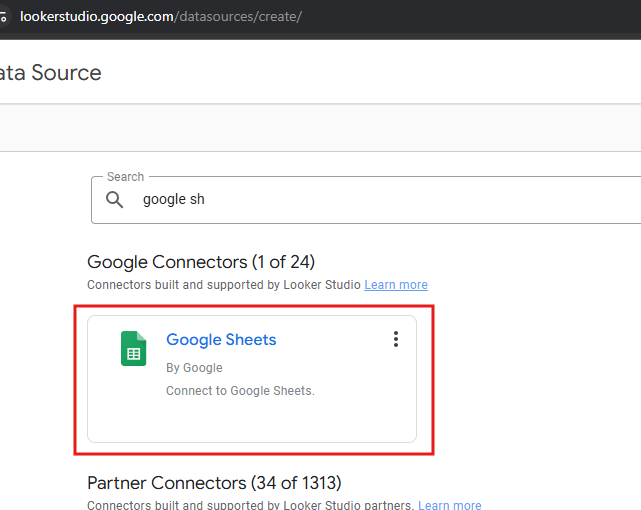 Create your visualizations using the Sheets data source. Since the data is already in Sheets, Looker loads it instantly.
**Pro tip**: Schedule your Sheets queries to refresh overnight. Your Looker Studio dashboards will have fresh data every morning with zero wait time.
## Benefits of the Sheets Approach
Sheets queries run in the background without the 6-minute limit. Large historical pulls complete successfully.
Looker reads from Sheets instantly. No waiting for API calls every time you view the dashboard.
Merge data from multiple platforms and accounts in a single sheet, then visualize in Looker.
Add formulas in Sheets to create custom metrics before they reach Looker Studio.
## When to Use Each Approach
| Scenario | Recommended Approach |
| --------------------------------- | ----------------------- |
| Small accounts, short date ranges | Direct Looker connector |
| Real-time data needed (hourly) | Direct Looker connector |
| Large accounts (Meta, TikTok) | Sheets → Looker |
| Historical data (3+ months) | Sheets → Looker |
| Multiple accounts combined | Sheets → Looker |
| 50+ accounts | Sheets → Looker |
## Still Experiencing Issues?
If you've tried these solutions and still encounter problems:
1. Check your internet connection stability
2. Try refreshing during off-peak hours
3. Contact [support@detrics.io](mailto:support@detrics.io) with details about your setup
**Need help setting up the Sheets workflow?** Our support team can guide you through the process. Reach out at [support@detrics.io](mailto:support@detrics.io)
Create your visualizations using the Sheets data source. Since the data is already in Sheets, Looker loads it instantly.
**Pro tip**: Schedule your Sheets queries to refresh overnight. Your Looker Studio dashboards will have fresh data every morning with zero wait time.
## Benefits of the Sheets Approach
Sheets queries run in the background without the 6-minute limit. Large historical pulls complete successfully.
Looker reads from Sheets instantly. No waiting for API calls every time you view the dashboard.
Merge data from multiple platforms and accounts in a single sheet, then visualize in Looker.
Add formulas in Sheets to create custom metrics before they reach Looker Studio.
## When to Use Each Approach
| Scenario | Recommended Approach |
| --------------------------------- | ----------------------- |
| Small accounts, short date ranges | Direct Looker connector |
| Real-time data needed (hourly) | Direct Looker connector |
| Large accounts (Meta, TikTok) | Sheets → Looker |
| Historical data (3+ months) | Sheets → Looker |
| Multiple accounts combined | Sheets → Looker |
| 50+ accounts | Sheets → Looker |
## Still Experiencing Issues?
If you've tried these solutions and still encounter problems:
1. Check your internet connection stability
2. Try refreshing during off-peak hours
3. Contact [support@detrics.io](mailto:support@detrics.io) with details about your setup
**Need help setting up the Sheets workflow?** Our support team can guide you through the process. Reach out at [support@detrics.io](mailto:support@detrics.io)